
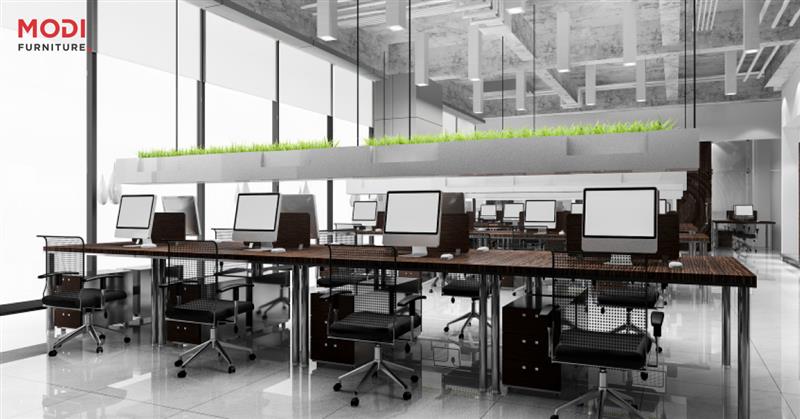
How to Design a Productive Computer Lab: Furniture, Layout & Ergonomics Tips
This guide walks you through every step of modern computer lab design. We'll cover layout planning, choosing the right IT lab furniture, and mastering ergonomics for students. You'll also learn about key features like cable management to build a safe, efficient, and future-proof learning environment, with special considerations for schools in India.
Phase 1: Strategic Planning for Your Computer Lab Design
Before you pick a single computer lab table, a successful design starts with a clear strategy. Answering a few foundational questions will define your lab's purpose and ensure it meets the needs of your students and staff.
Defining the Primary Use: STEM Education, Research, or General Access?
First, what is the lab for? A space for STEM education might need robust workstations for specific software, while a general access lab might prioritize flexibility. A research facility will have completely different needs. Defining the primary use helps guide all future decisions.
Calculating Space and Capacity Requirements Per Student
Think about how many students will use the lab at once. A good rule is to plan for 25-40 square feet per student. This provides enough room for a workstation, a chair, and clear pathways for people to move around safely and comfortably.
Assessing Power, Network, and Ventilation Needs
Modern labs have significant technical needs. Make sure you have enough electrical outlets and network ports for every workstation. Don't forget about ventilation. A room full of computers generates a lot of heat, and proper airflow is key to preventing equipment from overheating.
Setting a Realistic Budget for Furniture and Installation
Finally, set a clear budget. This should cover not just the computers but also all the computer lab furniture, installation costs, and any needed electrical or network upgrades. Planning your budget early helps you make smart choices without overspending.
Phase 2: How to Design a Computer Lab Layout for School Success
The physical layout of your lab affects everything from classroom management to learning styles. The right design can support both individual work and group projects, making the space more effective.
Classic Rows/Columns Layout: Pros and Cons for Instruction
This is the traditional setup, with desks in straight lines facing the front. It's great for lectures and direct instruction, as the teacher has a clear view of every screen. However, it can make group work and collaboration more difficult.
Pod or Cluster Design: Fostering Collaborative Learning
Arranging desks in small groups or "pods" is excellent for teamwork. This layout encourages students to work together and share ideas. It can be a bit harder to manage cables, but the benefits for collaborative learning are huge.
U-Shaped Layout: Ideal for Presentations and Demonstrations
A U-shaped layout places all workstations along three walls, with an open space in the middle. This is perfect for instructor-led demonstrations, as every student has a clear line of sight to the front of the room.
Perimeter Layout: Maximizing Central Floor Space
Similar to a U-shape, a perimeter layout lines the walls with computer stations. This opens up a large central area that can be used for other activities, group discussions, or even robotics projects.
Creating Flexible Zones for Adaptable Learning Scenarios
Want the best of all worlds? Create flexible zones. Use mobile furniture to set up different areas for different tasks—a quiet zone for individual study, a collaborative pod for group projects, and an area for presentations.
Phase 3: Selecting the Best Computer Lab Furniture
The right furniture is the backbone of a functional lab. It needs to be durable, comfortable, and suited to the tasks students will be performing.What to Look for in a Computer Lab Table or Workstation
When choosing a computer lab table, look for a few key things:
Durability: It should withstand daily use by many students. Size: It needs enough surface area for a monitor, keyboard, mouse, and writing space. Cable Management: Built-in solutions are a must for safety and organization. Ergonomics: The table should allow for proper posture.
Choosing Durable Materials: Steel, Wood, and Laminate Casework
For educational environments, durability is key. Steel casework is extremely strong and long-lasting. High-quality wood and laminate furniture are also great options that offer different aesthetics and can be very resilient. At Modi Furniture, we often recommend materials that balance strength with a clean, modern look.
Selecting Countertop Surfaces: Phenolic vs. Epoxy Resin vs. HPL
The countertop surface matters, too. High-Pressure Laminate (HPL) is a popular and cost-effective choice for general use. Phenolic resin offers superior resistance to impact and chemicals, making it great for STEM or science-adjacent labs.
Essential Lab Shelving, Cabinets, and Storage Solutions
A tidy lab is a productive lab. Make sure your design includes enough lab shelving and cabinets to store peripherals, software, paper, and other supplies. Good storage keeps clutter off the workstations and makes the space easier to manage.
The Role of Mobile Lab Carts for Flexibility
Mobile lab carts are a fantastic tool for creating an adaptable space. They can be used to hold shared equipment, as temporary workstations, or to easily reconfigure the room for different activities. This flexibility is a huge asset in a modern school.
Phase 4: Ergonomics: A Priority for Student Health and Focus
Students can spend hours in the computer lab. An ergonomic setup is vital to prevent strain, improve focus, and support their physical well-being.
What makes a computer table ergonomic for students?
An ergonomic computer table for students in India should have adequate knee and leg clearance. Its height should allow students to sit with their elbows at a 90-degree angle while typing, without shrugging their shoulders.
Choosing Adjustable Chairs for Varying Student Heights
Since students come in all sizes, adjustable chairs are non-negotiable. A good chair allows a student to sit with their feet flat on the floor, providing a stable and healthy posture. Proper Monitor, Keyboard, and Mouse Placement
Simple adjustments make a big difference: Monitor: The top of the screen should be at or just below eye level. Keyboard and Mouse: They should be close enough to use without reaching, keeping wrists straight.Reducing Glare with Smart Lighting and Screen Positioning
Screen glare can cause eye strain and headaches. Position monitors away from direct light from windows. Use blinds or anti-glare screens to reduce reflections and make screens easier to see.
Encouraging Good Posture and Regular Breaks
Ergonomic furniture helps, but habits are also important. Encourage students to sit up straight and take short breaks to stand up and stretch every 30-45 minutes.
Phase 5: Integrating Essential Features for a Modern IT Lab
A truly great lab is more than just tables and chairs. Key technical and safety integrations are what make the space truly functional and safe for everyone.
Best Practices for Effective Cable Management
Tangled wires are messy and dangerous. The best computer lab table design with cable management includes features to keep cords organized:
Grommets: Holes in the desktop to route cables through. Wire Trays: Baskets or channels mounted under the desk to hold cables and power strips. Raceways: Enclosed channels that run along walls or furniture to hide bundles of wires.Ensuring Adequate Ventilation and Cooling for Equipment
We mentioned it before, but it’s critical. Computers need to stay cool. Ensure your lab has good airflow, and consider extra air conditioning if the room gets too warm. This protects your investment and keeps the equipment running smoothly.
Planning for Accessibility and User-Friendly Workflow
Your lab should be accessible to all students. This means having wide aisles for wheelchair access and at least one workstation that can be easily adjusted for different needs. A logical workflow makes it easy for students to find what they need and move around the room without disruption.
Implementing Critical Lab Safety Measures (Electrical and Physical)
Safety is paramount. Secure all cables to prevent tripping hazards. Use surge protectors for all electronics. Ensure clear, unobstructed pathways to all exits in case of an emergency.
Phase 6: Future-Proofing Your Lab for Tomorrow's Technology
Technology changes fast. A smart design ensures your lab stays useful for years to come, accommodating new devices and teaching methods without a complete overhaul.
Designing for Technological Integration and Easy Upgrades
Choose furniture and layouts that make it simple to swap out old computers for new ones. Easy access to ports and power outlets is essential for smooth upgrades.
The Importance of Modular and Reconfigurable Furniture
Modular computer lab furniture is a smart investment. These pieces can be easily moved and rearranged to change the lab's layout as your needs evolve, offering incredible long-term value.
Planning for Future Power and Data Demands
Anticipate that future devices will require more power and faster network connections. When designing the lab, install more electrical and data outlets than you currently need. It’s much easier to do it now than to add more later.
Creating a Multi-Purpose Space for Evolving Curriculums
The most future-proof lab is one that can be used for many things. By using flexible furniture and creating distinct zones, your computer lab can support everything from coding and graphic design to e-sports and virtual reality.
Your Blueprint for a Better Computer Lab
Designing a productive computer lab is a process that balances layout, furniture, ergonomics, and technology. By focusing on a user-centric design that prioritizes flexibility and safety, you can create a powerful learning environment. This space will serve students today and adapt for the challenges of tomorrow.
Ready to build a state-of-the-art computer lab? Use these principles as your blueprint for success.
Frequently Asked Questions
What is the best layout for a computer lab?
The best layout depends on the lab's primary function. Cluster or pod layouts are excellent for collaboration, while traditional row layouts are better for direct instruction. A flexible design with zones often provides the most versatility for modern educational needs.
How can I find the best computer lab table design with cable management?
Look for tables with built-in features like wire trays, grommets, and raceways. Tables with modesty panels can also help conceal cables. Centralized power towers in pod layouts are another effective solution for clean cable management.
What are the key ergonomic factors for student computer stations?
Key factors include adjustable chair height to ensure feet are flat on the floor, monitor placement at or just below eye level, and keyboard positioning that allows for neutral wrist posture. An ergonomic computer table for students should accommodate these adjustments.
How much space is needed per student in a computer lab?
A general guideline is to allocate 25-40 square feet per student. This provides adequate space for the workstation, chair, and clear pathways for movement and accessibility, ensuring a safe and uncluttered environment.
What type of furniture is most durable for a school computer lab?
Steel casework and furniture with high-pressure laminate (HPL) or phenolic resin countertops are extremely durable and resistant to scratches, impact, and wear, making them ideal for high-traffic school environments.
What are the essential safety features for a computer lab?
Essential safety features include secure cable management to prevent tripping hazards, proper electrical grounding, adequate ventilation to prevent equipment overheating, and clear, unobstructed aisles for easy evacuation.
How do you design a flexible and collaborative computer lab?
Use modular and mobile furniture like lab carts and reconfigurable tables. Create distinct zones for group work, individual study, and presentations. Pod layouts are inherently more collaborative than traditional rows.
What are the specific needs for computer lab furniture for schools in India?
In India, considerations include durability to withstand frequent use and varying climate conditions, cost-effectiveness, and ergonomic designs that can accommodate a diverse student population. Sourcing from local manufacturers can also be beneficial.
How many computers should be in a school lab?
The number should be sufficient for the largest class size that will use the lab, ideally one computer per student. For a standard class of 30, you would need at least 30 student workstations plus an instructor station.
Why is ventilation important in computer lab design?
Proper ventilation and cooling are critical to prevent computers and servers from overheating, which can lead to performance issues and equipment failure. It also ensures a comfortable and healthy air quality for students and staff.
-

School Furniture Checklist: Everything Needed for a Modern School
September 16th, 2026 -
Classroom Furniture Guide: Choosing the Right Furniture for Schools
September 2nd, 2026 -
Modern Office Tables in Jaipur: A Guide to Premium Workspace Solutions
August 19th, 2026 -
 July 27th, 2026
