
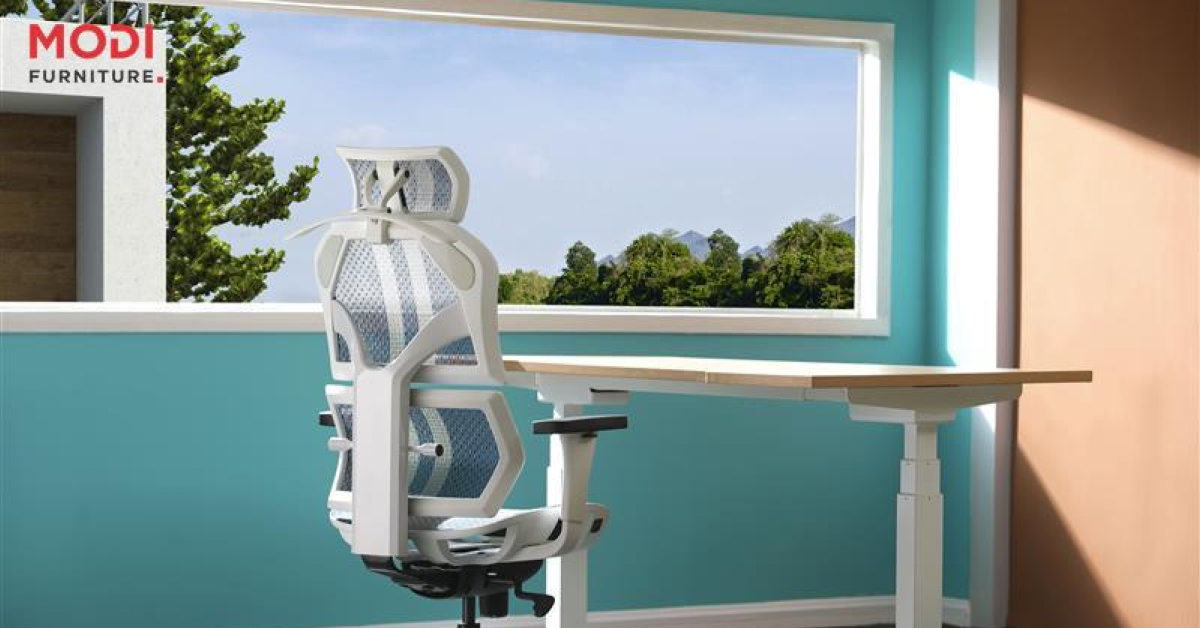
How to Choose Ergonomic Office Furniture: The Ultimate Guide
The problem might not be the work, but your workstation. The right setup can make a world of difference in how you feel and perform.
This guide will walk you through everything you need to know about choosing the right ergonomic office chair furniture . We'll cover how to select the perfect chair, desk, and accessories to create a setup that supports your health, prevents musculoskeletal injury, and helps you focus.
Why Ergonomically Designed Office Furniture is a Crucial Investment
Before looking at specific products, it’s important to understand the “why.” Office ergonomics is the science of fitting a workplace to the person, not forcing the person to fit the workplace. The benefits are real, and so are the risks of ignoring it.
The Key Benefits of Ergonomic Office Furniture
Investing in your comfort at work pays off in many ways. A proper workstation setup can lead to:
- Reduced Pain: Significantly lowers the risk of back pain, neck pain, and shoulder strain.
- Increased Comfort: Helps you feel better throughout your entire workday.
- Improved Focus: When you aren't distracted by discomfort, your concentration improves.
- Better Health: Lowers the risk of serious issues like carpal tunnel syndrome and tendinitis.
Common Health Issues from Poor Ergonomics: Back Pain, Neck Pain, and Carpal Tunnel Syndrome
Working for hours in a poorly designed space puts stress on your body. This can lead to common problems like chronic back pain and sharp neck pain from hunching over a screen.
Repetitive force on your wrists from a bad keyboard angle can also cause carpal tunnel syndrome, a painful condition affecting your hands and arms. Issues like bursitis and other musculoskeletal injuries are often linked to a poor workstation setup.
Understanding 'Neutral Body Posture': The Goal of Your Workstation
The main goal of all ergonomic furniture is to help you maintain a "neutral body posture." What does that mean?
It’s a comfortable, relaxed position where your joints are aligned naturally. Think of it like this:
- Your feet are flat on the floor.
- Your knees are at roughly a 90-degree angle.
- Your back is straight and supported.
- Your shoulders are relaxed, not hunched.
- Your wrists are straight when you type.
How Ergonomics Can Boost Productivity and Well-being
When your body is comfortable and supported, your mind is free to concentrate on work. You'll find yourself fidgeting less and focusing more. Over time, this small change adds up to a big increase in productivity and a much better sense of well-being at the end of the day.
The Foundation: How to Choose the Perfect Ergonomic Chair
Your chair is the most important piece of ergonomic furniture. A great ergonomic chair provides the support you need to maintain a healthy posture all day. Here’s a checklist of features to look for.
What Makes an Office Chair 'Ergonomic'?
A chair earns the "ergonomic" label when it is highly adjustable. It's not a one-size-fits-all product. At Modi Furniture, we believe a great chair should adapt to your unique body shape and size, not the other way around.
Essential Feature #1: Adjustable Seat Height and Depth
Your chair’s height must allow your feet to rest flat on the floor with your knees at a 90-degree angle. Seat depth is just as important. You should have 2-3 inches of space between the back of your knees and the edge of the seat.
Essential Feature #2: Proper Lumbar Support for Your Lower Back
This is a non-negotiable feature. Good lumbar support fits into the natural curve of your lower back. It prevents you from slouching and takes the strain off your spine, which is a major cause of back pain.
Essential Feature #3: Customizable Armrests
Armrests should be adjustable in height and width. The goal is to let your shoulders relax and your arms rest comfortably at a 90-degree angle. They shouldn't force you to shrug or hunch.
Essential Feature #4: Backrest Height and Tilt
An adjustable backrest lets you recline slightly, which can ease pressure on your spinal discs. Being able to change your position throughout the day is key to staying comfortable during long work sessions.
Choosing the Right Materials and Swivel Base
Look for breathable fabric to stay comfortable. A sturdy, five-point swivel base provides stability and allows you to move freely around your workspace without straining.
Selecting the Right Ergonomic Desk: Sit, Stand, or Both?
Your desk is the centerpiece of your workstation. The right height and size are crucial for keeping your body in a neutral posture and placing your equipment correctly. Let's look at the options.
Calculating Your Ideal Desk Height
For a standard sitting desk, the correct height allows your arms to rest at a 90-degree angle when typing. Your shoulders should be relaxed, not lifted. If a desk is too high or low, it forces you into an unnatural posture.
The Rise of the Standing Desk: Pros and Cons
Standing desks have become very popular for good reason. They allow you to change positions, which reduces the health risks of sitting all day. The key is balance—too much standing can cause fatigue. The best approach is to alternate between sitting and standing.
What to Look for in an Adjustable-Height Desk
If you opt for a sit-stand desk, look for one with a smooth, quiet motor. Models with memory presets are incredibly convenient, letting you switch between your perfect sitting and standing heights with the touch of a button.
Ensuring Adequate Surface Area for Your Equipment
Make sure your ergonomic desk has enough room for your computer monitor, keyboard, mouse, and any other tools you need. A cluttered desk can cause you to reach and twist, undermining your otherwise great ergonomic setup.
Completing Your Workstation: Essential Ergonomic Accessories
A great chair and desk are the start. But how you place your monitor, keyboard, and mouse is just as important for preventing eye strain and repetitive injuries.
Positioning Your Computer Monitor to Prevent Eye and Neck Strain
Proper monitor placement is simple but vital.
• Height: The top of your screen should be at or just below eye level.
• Distance: Place it about an arm's length away.
• Angle: Tilt it slightly upward to meet your line of sight.
This setup keeps your neck straight and reduces eye strain.
Choosing an Ergonomic Keyboard and Mouse
An ergonomic keyboard, such as a split or curved model, can help keep your wrists in a more natural, straight position. A vertical computer mouse can also reduce strain on your wrist and forearm.
Do You Need a Wrist Rest? The Great Debate
A wrist rest can be helpful, but only if used correctly. It’s designed for you to rest your palms on during breaks, not while you are actively typing. Resting on it while typing can bend your wrists and create pressure points.
The Role of a Footrest in Achieving a Neutral Posture
If your feet don't comfortably reach the floor after adjusting your chair height, a footrest is a great solution. It provides a stable surface to support your feet and maintain that ideal 90-degree knee angle.
Using a Document Holder to Minimize Neck Movement
If you frequently look between papers and your screen, a document holder is a smart addition. It holds your papers upright and next to your monitor, which stops you from constantly bending your neck down.
Considering an Ergonomic Headset for Phone Calls
Do you spend a lot of time on the telephone? Cradling a phone between your ear and shoulder is a major cause of neck pain. A simple headset frees up your hands and keeps your neck and spine aligned.
Beyond Furniture: Optimizing Your Environment and Habits
True office ergonomics is about more than just equipment. Your surroundings and daily habits play a huge role in your health and comfort.
The Importance of Proper Office Lighting and Reducing Glare
Good lighting is essential for preventing eye strain and headaches. Position your workstation so that bright lights or windows don't create glare on your screen. Use task lighting if you need more focused light.
Organizing Your Workspace for Efficiency and Comfort
Keep the items you use most often, like your mouse and phone, within easy reach. This prevents you from copnstantly twisting or stretching, which can cause strain over time.
Incorporating Movement: The Power of Stretching and Taking Breaks
No ergonomic furniture can replace the need for movement. Make a habit of standing up, stretching, and walking around for a few minutes every hour. Simple stretches for your neck, shoulders, and wrists can make a big impact.
When to Consider Physical Therapy or Occupational Therapy
If you experience persistent pain despite improving your workstation, it may be time to see a professional. Physical therapy or occupational therapy can help address underlying issues and provide personalized advice for your workplace.
Choosing the right ergonomic furniture for office is an investment in your long-term health and daily productivity. By focusing on adjustability and support for a neutral body posture, you can build a workstation that prevents pain, reduces injury risk, and helps you feel your best. The experts at Modi Furniture can help guide you to the perfect setup. Remember to listen to your body, make small adjustments as needed, and prioritize movement throughout your day.
Frequently Asked Questions (FAQ)
What is the most important piece of ergonomic office furniture?
The most important piece is the adjustable chair. It forms the foundation of your posture and supports your spine, pelvis, and legs, impacting the setup of your entire workstation.
How do I know if my office chair is truly ergonomic?
A truly ergonomic chair will have multiple points of adjustment, including seat height, seat depth, backrest angle, and armrest height/width. Crucially, it must have adjustable lumbar support to fit the curve of your lower back.
Are standing desks actually better for you?
Standing desks are beneficial because they promote changing positions. The ideal setup involves alternating between sitting and standing throughout the day, as staying in any single posture for too long can cause strain.
What is the correct ergonomic height for my computer monitor?
The top of your monitor screen should be at or slightly below your eye level. Your eyes should look slightly downward when viewing the center of the screen, which helps keep your neck in a neutral position.
Do I need a wrist rest for my keyboard?
Not necessarily. The goal is to keep your wrists straight (neutral) while typing. A wrist rest can help, but if it causes you to bend your wrists upwards, it can do more harm than good. Proper chair and desk height are more critical.
How can I make my current office setup more ergonomic on a budget?
Start with small changes. Use a rolled-up towel for lumbar support, place books under your monitor to raise its height, and ensure your feet are flat on the floor (or use a small box as a footrest). Prioritize an adjustable chair first when you are able to invest.
What is 'neutral body posture'?
Neutral body posture is a comfortable, unstrained position where your joints are naturally aligned. For office work, this typically means feet flat on the floor, knees at a 90-degree angle, a straight back, relaxed shoulders, and neutral wrists.
Can ergonomic furniture fix my existing back pain?
Ergonomic furniture can significantly help alleviate and prevent back pain caused by poor posture and lack of support. However, for chronic or severe pain, it's essential to consult a doctor or physical therapist.
How often should I take a break from sitting?
It's recommended to take a short break from sitting at least once every hour. Even standing up and stretching for a minute or two can help reduce the strain of prolonged sitting. The 20-20-20 rule (look at something 20 feet away for 20 seconds every 20 minutes) is great for eye strain.
What is the biggest mistake people make with office ergonomics?
The biggest mistake is 'set it and forget it.' People often fail to properly adjust their new ergonomic furniture to fit their specific body. Take the time to fine-tune every setting on your chair, desk, and monitor to achieve a truly neutral posture.
-

School Furniture Checklist: Everything Needed for a Modern School
September 16th, 2026 -
Classroom Furniture Guide: Choosing the Right Furniture for Schools
September 2nd, 2026 -
Modern Office Tables in Jaipur: A Guide to Premium Workspace Solutions
August 19th, 2026 -
 July 27th, 2026
